
Best Standing Desk Converters for Home Offices (2026): 5 Picks by Desk Size and Budget
Compare standing desk converters by stability, ergonomics, keyboard space and fit, using manufacturer specs and independent hands-on testing.
By Alfred Rilloraza · Published October 30, 2026 · Updated October 30, 2026
We may earn a commission from links on this page. Paid links are labeled.
Quick answer
The Ergotron WorkFit-S is our best overall pick because you can set monitor height and keyboard height separately, and it has a 5-year warranty, but it costs the most. The Victor DCX760 is the best budget pick, with a large, stable platform. The Ergotron WorkFit-T is the best ready-to-use option because it ships fully assembled. If your budget is close to the price of a full standing desk, a desk may be the smarter buy.
This guide is general information, not medical advice. If you have pain or a medical condition, talk to a clinician.
Our top picks at a glance
BEST OVERALL
Ergotron WorkFit-S
Keyboard and monitor heights adjust separately.
Check latest pricePaid linkBEST BUDGET PICK
Victor DCX760
A large, stable platform at the lowest price tier.
Check latest pricePaid linkBEST READY-TO-USE PICK
Ergotron WorkFit-T
Ships fully assembled and sits straight on your desk.
Check latest pricePaid linkWhy this guide
A standing desk converter sits on top of your existing desk and lifts your monitor and keyboard so you can work standing up. It's the cheapest way to try standing without replacing your desk, but the category is full of trade-offs. Some converters wobble, many raise your keyboard higher than you'd like when you sit, and the cheapest ones often skimp on ergonomics.
This guide compares five converters for home offices, from the budget Victor DCX760 to the premium Ergotron WorkFit-S. We also cover when a full standing desk is the smarter buy, which is a fair question once a converter's price climbs.
Prices change often, so we show price tiers instead of exact prices. Use the buttons to see the current price.
How we chose
We have not hands-on tested these converters. We built this list from manufacturer and retailer specifications, workplace-ergonomics guidance, and independent testing. Our main testing source is the BTOD Learning Center, whose reviewer keeps more than 40 converters in a testing room and scores each one on keyboard space, ease of use, stability, ergonomics, task space, build quality and warranty. BTOD is also an office furniture dealer that sells some of the products it reviews, so we treat its scores as one input, not the final word.
We looked for converters that make honest trade-offs, have a clear weight rating and a stated warranty, and cover different desk sizes and budgets. We grouped them into three price tiers: budget, mid-range and premium. Where sources disagree or specs vary by version, we say so and tell you to check the exact version you're buying. We earn a commission if you buy through our links, at no extra cost to you. Commissions do not decide which converters make the list or how they rank.
BEST OVERALL
1. Ergotron WorkFit-S

Illustration of this type of chair. See the product page for photos.
The Ergotron WorkFit-S is our best overall pick because it handles ergonomics better than the other converters on our list. It clamps to the front of your desk, and it moves straight up and down so it doesn't intrude into your space when you stand. Its keyboard tray can drop below the desk surface, and the monitor adjusts separately, so you can set screen height and keyboard height independently. The BTOD reviewer rated it the most well-rounded converter he has tested, with the top score on his list of 83 out of 100, and its counterbalance system means no buttons or levers.
The keyboard and monitor lift about 18 inches together, the monitor adjusts another 4.8 inches independently, and the clamp fits desktops from 0.47 to 2.4 inches thick. Load ratings vary by version, from about 25 to 31 pounds in total on the dual-monitor models, so check which version you're buying. It carries a 5-year warranty.
The downsides are real. The reviewer noted more keyboard bounce than most converters, a long assembly process, a small keyboard tray and a poor return policy. Because of that return policy, check your seller's terms before you order. If you want one converter that does the most things well and you can afford it, this is the one.
- Independent monitor and keyboard height
- 18-inch keyboard lift
- Clamp mount
- About 25-31 lb capacity (varies by version)
- 5-year warranty
Pros
- Best ergonomics we found
- Counterbalance adjustment, no buttons
- Keyboard drops below the desk
- Strong warranty
Cons
- Highest price tier
- Keyboard bounce
- Long assembly
- Small keyboard tray
Who should skip this: Skip it if you can't clamp to your desk, need a large flat platform, or want the lowest price.
Price tier: Premium
Check latest pricePaid linkBEST BUDGET PICK
2. Victor DCX760

Illustration of this type of chair. See the product page for photos.
The Victor DCX760 is our best budget pick, and it earns the title with stability. It has a double-X base that moves straight up and down, gas cylinders that make adjusting easy, and 12 height options, and the reviewer found it stable at every height, so keyboard bounce and monitor sway matter less here than on many converters.
The platforms are big. The upper surface is 36 inches wide and 23 inches deep and rises up to 20 inches, and the keyboard tray is 35 inches wide and 14 inches deep, rising up to 14.5 inches. The monitor platform holds dual 24-inch monitors, and a grommet mount lets you add a monitor arm. Victor's instructions rate the upper platform for up to 34 pounds and the keyboard tray for up to 6 pounds, and the warranty is 3 years.
The compromises are on the ergonomics side. Monitor and keyboard heights move together, so you need a monitor arm for fully independent adjustment. The converter has no infinite position lock, requires assembly, raises your minimum keyboard height, and has a shorter warranty than the industry leaders. If you want a large, stable platform at a low price, it's the best fit we found.
- 36-inch platform
- 35-inch keyboard tray
- Gas spring lift
- 12 heights
- 49 lb unit
- 3-year warranty
Pros
- Stable at all heights
- Large surfaces
- Grommet for a monitor arm
- Budget tier
Cons
- No independent monitor adjustment without an arm
- Raises minimum keyboard height
- Assembly required
- Shorter warranty
Who should skip this: Skip it if you want infinite height positions or the best seated ergonomics.
Price tier: Budget
Check latest pricePaid linkBEST READY-TO-USE PICK
3. Ergotron WorkFit-T

Illustration of this type of chair. See the product page for photos.
The Ergotron WorkFit-T is the converter to buy if you don't want to assemble anything. It comes fully assembled and sits directly on your desk. The surface is 35 inches wide, the lift range is 15 inches, and the total weight capacity is 10 to 35 pounds. A spring-loaded mechanism gives it 20 locking height settings.
The BTOD reviewer called it one of the most stable converters he has tested at sitting and standing height, noting that it holds dual 24-inch monitors and ships ready to use with a 30-day guarantee. Ergotron backs it with a 5-year warranty.
The catch is the keyboard tray. It's only 25 inches wide and 9 inches deep, so it suits compact keyboards. The reviewer also noted it isn't dual ergonomic, raises your minimum keyboard height, and has a limited adjustment range. It needs a desk at least 24 inches deep and has a footprint of about 35 by 25 inches, so measure first. If you want stability and a quick setup and use a compact keyboard, it's an easy recommendation.
- Ships fully assembled
- 15-inch lift
- 10-35 lb capacity
- 25 x 9 inch keyboard tray
- 5-year warranty
Pros
- No assembly
- Stable
- 20 locking heights
- Strong warranty
Cons
- Small keyboard tray
- Not independently adjustable
- Raises minimum keyboard height
- Limited range
Who should skip this: Skip it if you use a full-size or ergonomic keyboard, or your desk is under 24 inches deep.
Price tier: Mid-range
Check latest pricePaid linkBEST FOR TALL USERS
4. Humanscale QuickStand Eco

Illustration of this type of chair. See the product page for photos.
The Humanscale QuickStand Eco is the pick for tall users. Its adjustment range fits people up to 6 feet 7 inches, which is more than most converters offer, and the reviewer noted high build quality and a strong warranty. It's a post-and-tray design with a freestanding base, so you don't clamp it to your desk.
The worksurface is 28 by 19 inches, it rises 18.6 inches, the monitor adjusts 5.5 inches, and the total capacity is 35 pounds. It comes in single, dual and laptop versions, so check which one you're buying. Humanscale gives it a 5-year warranty.
The trade-offs are real. The reviewer noted keyboard bounce, assembly, a monitor height adjustment that requires removing screws, and a keyboard design that raises your minimum keyboard height by more than an inch, so it's not ergonomic while seated. If you're tall and other converters don't reach high enough, the Eco is worth the money. If you're average height, the Victor or WorkFit-T may suit you better.
- Fits users up to 6 ft 7 in
- 18.6-inch lift
- 28 x 19 inch surface
- 35 lb capacity
- 5-year warranty
Pros
- Large adjustment range
- High build quality
- Counterbalance adjustment
- Freestanding base
Cons
- Keyboard bounce
- Monitor adjustment needs screws
- Raises minimum keyboard height
- Assembly required
Who should skip this: Skip it if you spend lots of time seated at the converter or want a fast, tool-free monitor adjustment.
Price tier: Mid-range
Check latest pricePaid linkBEST FOR MULTIPLE MONITORS
5. Innovative Winston

Illustration of this type of chair. See the product page for photos.
The Innovative Winston is the converter for multi-monitor setups. The BTOD reviewer calls it the only converter he knows of that can hold four monitors, and it has a large work surface. The standard surface is 30 by 23 inches, with a compact option available, and the keyboard platform moves between about 1.3 and 18.3 inches above your desk with infinite height settings. It has dual ergonomics, so the monitors adjust independently.
Weight rating depends on the version, and it has a minimum as well as a maximum. Totals run from 7 to 20 pounds for one monitor, 10 to 26 for two, 15 to 36 for three and 24 to 40 for four, and loads outside the range can make the unit work incorrectly. Innovative gives it a 5-year warranty.
It's heavy and fiddly. One retailer says the base single-monitor model weighs 84 pounds, so get help moving it. The reviewer noted that adjusting monitor height means loosening screws, the thick tray raises your minimum keyboard height by almost 1.5 inches, and assembly and shipping take a while. Choose it only if you need that monitor capacity.
- Up to four monitors
- 30 x 23 inch surface
- About 17-inch lift
- 7-40 lb by version
- 5-year warranty
Pros
- Holds up to four monitors
- Large work surface
- Independent monitor adjustment
- Infinite height settings
Cons
- Heavy
- Monitor height needs screws
- Raises minimum keyboard height
- Assembly and long shipping
Who should skip this: Skip it if you use one or two monitors or want a light, quick-setup unit.
Price tier: Mid-range
Check latest pricePaid linkSide-by-side comparison
| Product | Price tier | Best for | Key feature | Weight rating | Link |
|---|---|---|---|---|---|
| Ergotron WorkFit-S | Premium | Best ergonomics | Keyboard and monitor adjust separately | About 25-31 lb (varies by version) | Check latest pricePaid link |
| Victor DCX760 | Budget | Large, stable platform | 36-inch surface | 34 lb platform, 6 lb tray | Check latest pricePaid link |
| Ergotron WorkFit-T | Mid-range | No assembly | Ships fully assembled | 10-35 lb | Check latest pricePaid link |
| Humanscale QuickStand Eco | Mid-range | Tall users | Fits users up to 6 ft 7 in | 35 lb | Check latest pricePaid link |
| Innovative Winston | Mid-range | Multiple monitors | Holds up to four monitors | 7-40 lb by version | Check latest pricePaid link |
Standing desk converter buying guide
Converter or full standing desk?
A converter makes sense when you want to keep your desk, can't replace it, have an L-shaped or corner desk, or want to test the standing habit first. A full standing desk is often the better buy when your budget is close to the price of one, when you want a large flat surface, or when stability matters most. The BTOD reviewer notes that higher-end converters can cost as much as many full electric desks. Our guide to the best standing desks covers that option.
Pick the right design
Fixed dual-platform converters, like the Victor DCX760 and WorkFit-T, are simple and often need little assembly, but monitor and keyboard heights move together. Post-and-tray converters, like the WorkFit-S and Eco, let you adjust keyboard and monitor separately, but take more assembly. Floating converters swing out of the way but tend to bounce more, and electric ones add complexity.
Measure your desk and your load
Measure your desk's depth, because the WorkFit-T needs at least 24 inches, and check clamp thickness for models like the WorkFit-S. Add up your monitors, keyboard and accessories and stay inside the weight rating. If you work from a laptop, plan on adding a separate keyboard and mouse. Using the laptop's own keyboard puts the screen too low or the keyboard too high.
Set it up so it helps
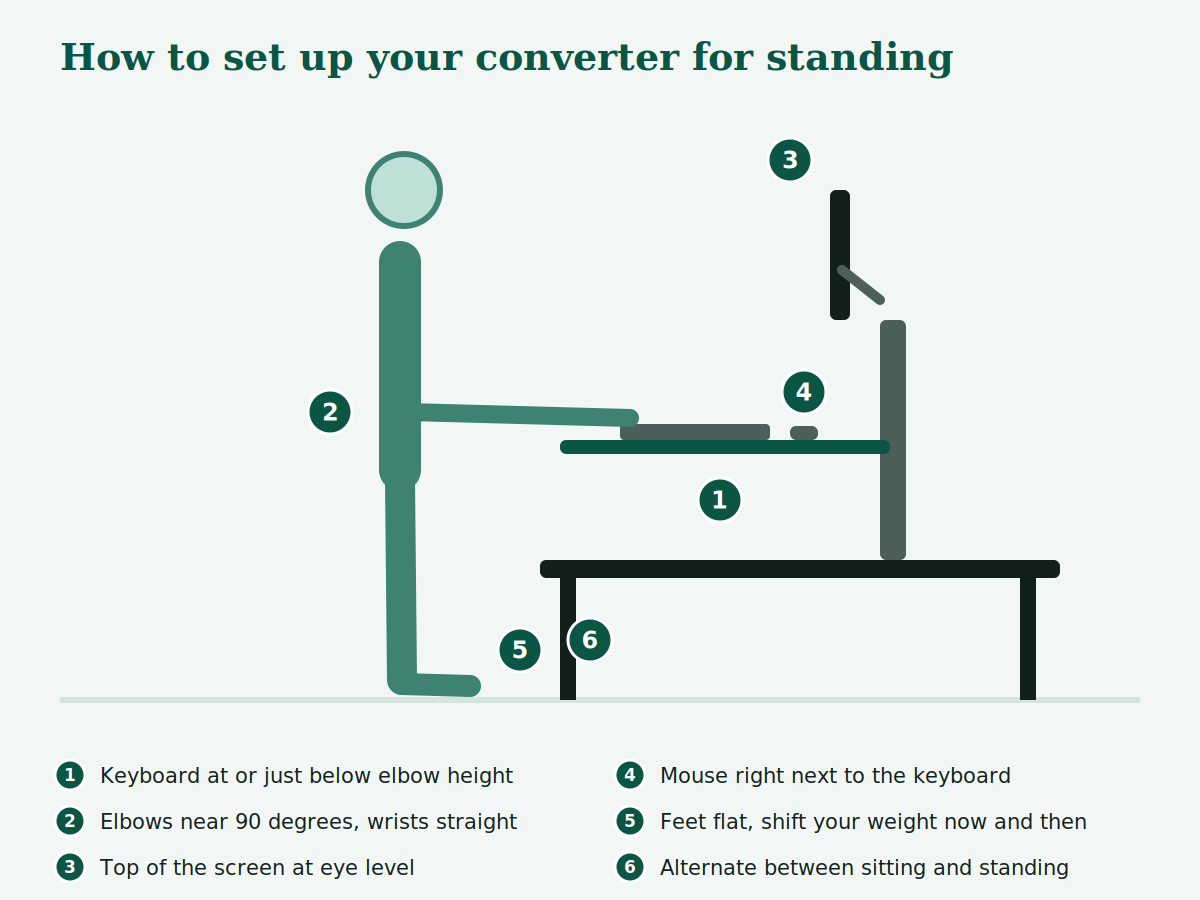
The Ergonomics Center of North Carolina advises raising the workstation to or just below standing elbow height, with the keyboard and pointing device directly in front of you. The University of Pennsylvania's fact sheet adds that elbows should stay near 90 degrees, with the mouse close to the keyboard and the top of the screen at eye level. Workplace safety guidance recommends alternating between sitting and standing often.
Frequently asked questions
Is a standing desk converter worth it, or should I buy a standing desk?
A converter makes sense when you want to keep your current desk, can't replace it, or want to test the habit first. A full electric standing desk is often better when you want a large flat surface and more stability, or when the converter's price is close to a desk's. High-end converters can cost as much as many full desks.
Will a standing desk converter fit my desk?
Check the desk's depth, the converter's footprint, and, for clamp-on models like the WorkFit-S, your desktop's thickness. The WorkFit-T needs a desk at least 24 inches deep, and the WorkFit-S clamps to desktops 0.47 to 2.4 inches thick. Confirm the weight rating covers your monitors and accessories.
Why do standing desk converters wobble?
Almost every converter moves a little at standing height. The bigger issue is usually keyboard bounce, because the tray sticks out in front of the base. Stability depends on the base design and on the desk underneath. Keep heavy items centered and toward the back, and avoid leaning on the tray.
Are the cheapest standing desk converters worth it?
Often not. In BTOD's test of 33 converters, the lowest-priced models, including VIVO's, scored at or near the bottom on ergonomics, build quality and warranty. A budget pick with a stable base, like the Victor DCX760, is a safer low-cost choice, and a used converter from a proven brand can beat a new no-name one.
How often should I stand?
Workplace safety guidance says to alternate between sitting and standing often and not stay in either position for too long. Find a ratio that suits you, and take short movement breaks in between.
Sources
- BTOD Learning Center: Best Standing Desk Converters
- Victor DCX760 product page and spec sheet
- Ergotron WorkFit-S and WorkFit-T specifications (manufacturer and retailer listings)
- Humanscale QuickStand Eco specifications
- Innovative Winston specifications
- Ergonomics Center of North Carolina: standing workstation handout
- University of Pennsylvania: Adjustable Height Workstation Fact Sheet
- Workplace NL: Sit/stand workstations